Equipment Schedule Takeoffs: Reading the Schedule vs. Counting the Plans
Updated: Aug 8
Introduction
The equipment schedule is the densest page in the whole drawing set. One sheet, a dozen tables, and every attribute you need to price a job — tags, capacities, motor data, basis-of-design models, accessory codes. It's also the page most likely to send a takeoff sideways.
The reason is simple: an equipment schedule takeoff and a plan takeoff answer two different questions, and neither one answers both. Estimators who work only from the schedule get perfect specifications for the wrong quantities. Estimators who work only from the plans get perfect quantities for equipment they can't price. Getting to a quote-ready Bill of Materials means reconciling the two — and that reconciliation is where hours disappear.
What Is an Equipment Schedule?
An equipment schedule is a table on the mechanical drawings that lists every piece of scheduled equipment on the project along with its design attributes. On a typical HVAC set you'll find separate schedules for rooftop units, air handlers, exhaust and supply fans, VAV terminal units, pumps, split systems, ERVs, unit heaters, and air outlets — usually grouped on dedicated sheets in the M-500 series, sometimes scattered across plan sheets on smaller jobs.
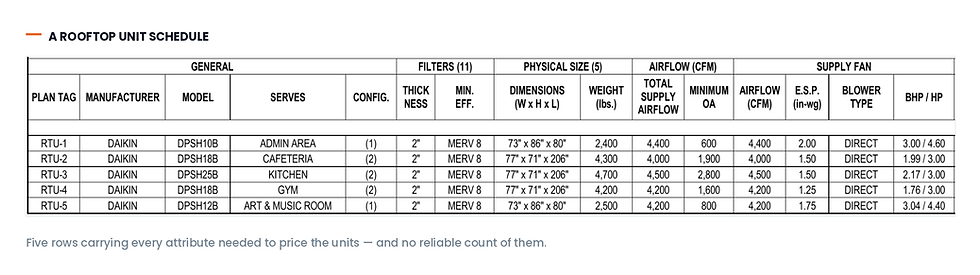
Each row is one tagged unit. The columns vary by discipline and by engineer, but an RTU row typically carries the tag, manufacturer, model, area served, supply and outside-air CFM, cooling and heating capacity, external static pressure, motor horsepower, electrical characteristics, operating weight, basis-of-design manufacturer and model number, and a string of accessory or remark codes that expand into notes below the table.
The Schedule Tells You What. The Plan Tells You The Count.
On a small project the two line up cleanly: four rooftop units on the schedule, four RTU tags on the roof plan. On anything larger, the relationship breaks down fast.
Schedules describe unit types, not unit instances. A single row for EF-1 might correspond to fourteen identical exhaust fans scattered across three floors. A row labelled "VAV-1 THRU VAV-24" collapses twenty-four terminal units into one line. Some engineers include a quantity column, some don't, and when they do it isn't always maintained through revisions.
Plans have the opposite problem. Every tag on the plan is a real instance in a real location, which is exactly what you need for counting — but a tag alone is worthless for pricing. VAV-12 tells you nothing about inlet size, primary CFM, reheat coil rows, or GPM. You have to go back to the schedule to price it, and you have to go to the spec book to know whether the basis-of-design model is the one you're allowed to quote.
So the real work isn't reading either document. It's reconciling them.
Seven Ways Equipment Schedule Takeoffs Go Wrong
1. "Typical of 6." The plan shows one unit with a note that multiplies it. Miss the note, quote one fan, lose the job — or worse, win it.
2. Ranged and merged rows. "VAV-1 THRU VAV-24" or a row with merged cells covering five tags. Anyone counting rows instead of tags undercounts by an order of magnitude.
3. Quantity columns that lie. A QTY column that says 2 while the plan shows 3, usually because a unit was added late and the schedule wasn't updated.
4. Double counting across sheets. The same RTU appears on the mechanical plan, the roof plan, the structural curb detail, the electrical one-line, and the controls diagram. Five appearances, one unit. Manual counts and generic symbol-counting tools both inflate here.
5. Tags on the plan that never made it into the schedule. And scheduled units that were deleted from the plans. Both happen constantly, and both are invisible unless you're actively comparing the two sets.
6. Revised schedules from addenda. Addendum 2 reissues sheet M-501 with three new VAVs and a changed RTU-3 capacity. The original sheet is still sitting in the set. Working from the wrong revision is one of the most expensive mistakes in plan-and-spec bidding.
7. Alternates and phasing. "Add Alternate No. 2 includes RTU-7 and associated curb." Scheduled, drawn, and not in the base bid. Quote it as base scope and your number is wrong in a way that's hard to explain later.
None of these are exotic. They're on almost every set of drawings that crosses an estimator's desk.
How HyperQuote Reads Equipment Schedules
HyperQuote treats the schedule as structured data, not as a picture of a table — and then it treats the plan as the authority on quantity.
It locates and parses the schedule tables. Schedule sheets get identified across the set, including schedules embedded on plan sheets, and each table is read with its column structure intact — headers, continuation rows across page breaks, merged cells, and the remark codes that expand into the notes beneath.
It normalizes tags. Ranged entries are expanded into individual tags, so "VAV-1 THRU VAV-24" becomes twenty-four addressable units rather than one line item.
It counts instances from the drawings. Every tag occurrence is found on the plans and deduplicated across sheets, so a rooftop unit that appears on four different drawings is still one unit — and a "typical of 6" note resolves to six. Each tag carries its own total, which is where the schedule and the building quietly diverge.

It cross-references the specification. The schedule's basis-of-design model gets checked against the spec section, which is where acceptable manufacturers, required accessories, and substitution language actually live.
It reports the discrepancies instead of hiding them. Tags on the plans with no schedule row. Scheduled units with no plan location. Quantity columns that disagree with the drawn count. These get surfaced as exceptions for review rather than silently resolved — because on a bid, a flagged discrepancy is a question for the engineer, not a number to guess at.
Every line traces back. Each count links to the sheet and location it came from, so review means spot-checking rather than recounting.
A Worked Example
Take a three-storey medical office building. The mechanical schedules run to two sheets:
RTU schedule — 4 rows, RTU-1 through RTU-4, each a distinct unit
Fan schedule — 6 rows covering EF-1 through EF-6, but the plans show EF-3 appearing on every floor and EF-5 noted "typical of 4"
VAV schedule — 3 rows using ranged tags, covering VAV-1 through VAV-38
Counted by schedule rows: 13 pieces of equipment. Counted by tag instances on the plans: 4 RTUs, 15 fans, 38 VAVs — 57 pieces.
Same drawing set, same schedules, a 4× difference in scope. Then Addendum 1 reissues the VAV schedule with two additional units and revises the reheat coil on the third-floor group, and the count moves again.
This is the failure mode the term "equipment schedule takeoff" is really pointing at. The schedule is a specification document that estimators are asked to use as a counting document, and it was never built for that.
What a Schedule-Driven BOM Looks Like
The output of a proper equipment schedule takeoff isn't a count. It's a Bill of Materials where every line already carries what's needed to price it:
Tag and instance count, deduplicated across the full set
All scheduled attributes — capacity, airflow, static pressure, electrical, weight
Basis-of-design manufacturer and model, with the spec section that governs it
Accessories expanded from remark codes into real line items
Location reference for every counted instance
An exceptions list of everything that didn't reconcile
Which of those columns appear, and in what order, is up to you — and it's set per equipment type, because the attributes that matter aren't the same from one to the next. A VAV line wants inlet size, primary CFM, and reheat coil data. A rooftop unit wants tonnage, ESP, and electrical characteristics. A grille wants neck size, face size, and finish. Forcing all of them into one column layout produces a spreadsheet that's half empty and half wrong, so each equipment type carries its own.

That matters more than it sounds. The BOM isn't a report to be read once — it's the thing that gets exported, priced, and pasted into a quote. When its columns already match how your team quotes that product line, the reformatting step disappears.
Why This Matters More for Distributors
Contractors take off a set they'll build. Distributors take off sets they may never win — often several a week, under deadline, across HVAC/R and plumbing, with no site knowledge and no design context to fall back on.
That makes schedule accuracy a volume problem, not a craftsmanship problem. When the count comes out of the set reliably, the estimator's time moves to the part that actually wins bids: product selection, pricing strategy, lead times, and getting the number back first.
Frequently Asked Questions
What is an equipment schedule takeoff? It's the process of extracting equipment quantities and specifications from the schedules on a set of construction drawings, then reconciling those schedules against the plans to determine how many of each scheduled unit the project actually contains.
Can you do a takeoff from the equipment schedule alone? Not reliably. Schedules describe unit types and their design attributes, but most don't carry accurate quantities. Ranged tags, "typical of" notes, and stale quantity columns mean the plans have to be counted and reconciled against the schedule.
How do you avoid double counting equipment across sheets? By counting tag instances rather than symbol occurrences. The same RTU legitimately appears on mechanical, roof, structural, electrical, and controls sheets — so each occurrence needs to be tied back to its tag and deduplicated.
What happens when an addendum revises the schedule? The reissued sheet supersedes the original, but both usually remain in the set. A dependable takeoff process identifies the current revision of each schedule and flags what changed against the previous count.
See It on Your Own Schedules
The fastest way to judge an equipment schedule takeoff is on a set you already know the answers to. Send us a recent bid package — we'll process the schedules and show you the reconciled Bill of Materials, exceptions included.